
Order Processing turns emails into priced, confirmed orders.
Reads every emailed order — even a photo — matches it to your products, prices it for that customer, and places it with the invoice sent.
Illustrative · one email becoming a priced, confirmed order
The job it owns, exactly.
Every order that lands by email. PDF, spreadsheet — even a photo.
Which product, at whose price. Your catalogue, that customer's rates.
Places the official order. Sends the confirmation and invoice.
Confirmed orders, no retyping. Only the odd ones wait for you.
A line it can't match, or a price out of pattern, waits for your approval — it never guesses.
One messy email, start to finish.
The kind of order you'd normally retype — watch it go through.
Gary Whitmore — Whitmore Signs & Print
order for this week pls
Morning — usual bits plus a couple extra. 2x screenwash, the big drums, and 5L stencil strip that mesh we had in March, same again x3 1 box of the blue tape. Cheers, Gaz
- Reads all four lines — "the big drums" included
- Matches each line to your live catalogue
- Prices at Whitmore's agreed rates
- Places the order, sends confirmation + invoice
Morning Gaz — all four in: 2× 25L Screenwash, 5L Stencil Strip, 3× 120T mesh (same as March), and a box of blue tape. Confirmation and invoice attached — with you Wednesday.
No one retyped a thing — and "the mesh we had in March" still matched.
Your orders, before and after.
- Orders retyped line by line
- Photos and PDFs deciphered by hand
- Price lists checked twice
- Mistakes found at invoice time
- Every format read on arrival
- Lines matched to real products
- That customer's price, first time
- Invoice out with the confirmation
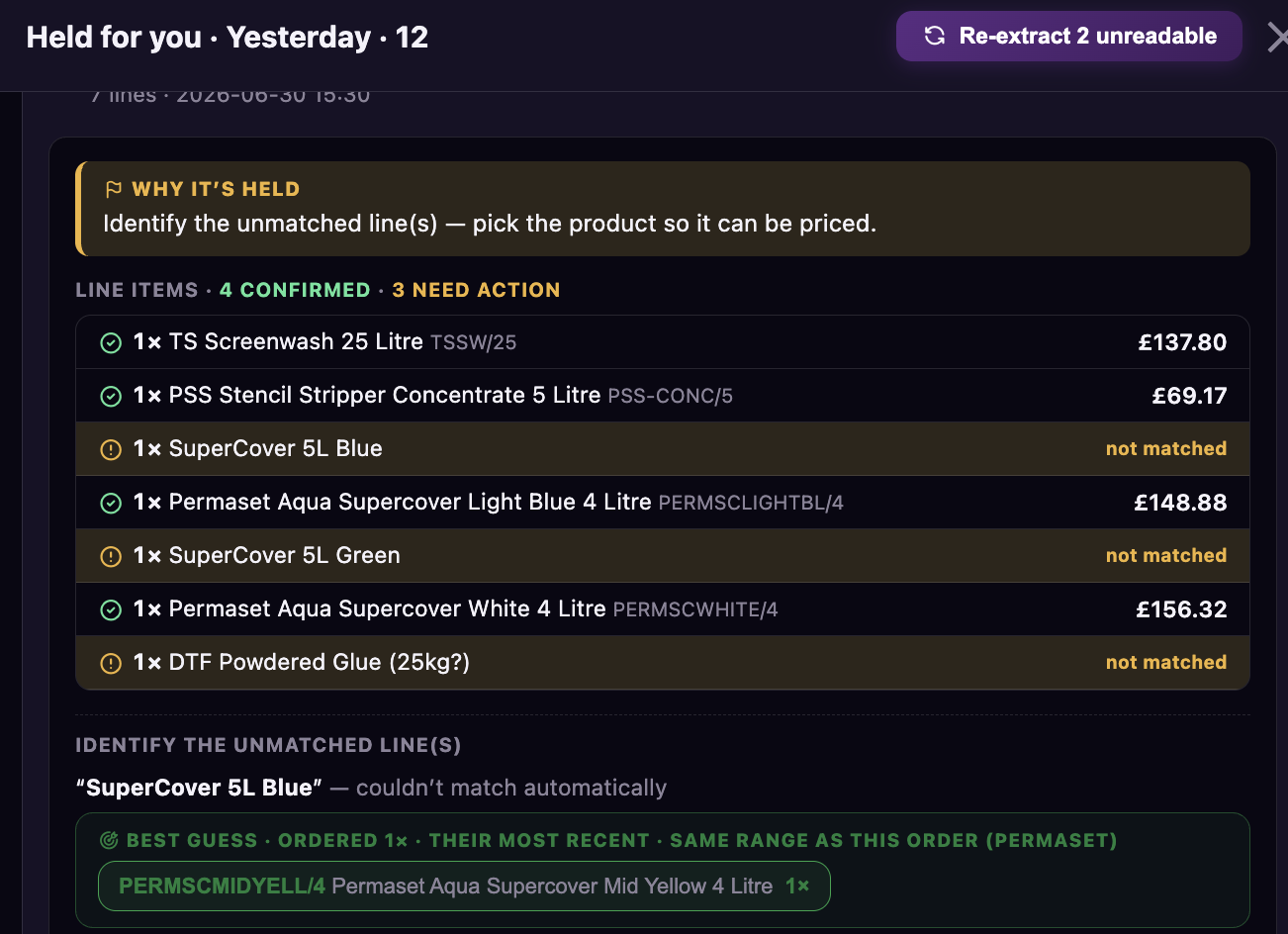
Matching a live order, line by line — Real screen · live on SISS
The honest answers.
It doesn't work alone.
One of six workers, all thinking from one brain. What one learns, they all know.

Book a demo and we'll show it pricing a real order.
Thirty minutes, your messiest order email — and an honest answer on whether it's the right first hire.
Book a demo →